
Multiple locations
Booking software for multiple locations
Run all your locations from one workspace, without giving every manager access to everything.
Give staff and admins exactly the rights they need. Per area and per location.
One workspace for all your locations
Whether you have two locations or a growing chain: you want a central overview without every location seeing everything of the others.
With Zen Booking you manage locations within one business. Appointments, staff and rosters stay neatly separated where needed.
The owner keeps the full overview. Local managers only work with their own location.
Central for you. Clear for your team.
- All locations in one workspace
- Rights per admin
- Access per location
- One calendar and customer system
- No separate accounts or systems per location
Location access
- Amsterdam Zuid
- Haarlem Centrum
- Utrecht Oost
Manager Amsterdam
Multiple locations
Give managers access to their own location only
Not every admin needs to see everything. You decide per admin what someone may do:
Appointments
View and manage appointments.
Team & roster
Manage staff and adjust rosters.
Settings
Manage the general business settings.
Financial data
Access financial information and settings.
On top of that, you decide which locations these rights apply to.
For example
A manager in Amsterdam
Say you have locations in Amsterdam, Haarlem and Utrecht. The Amsterdam manager might get:
That manager only sees what Amsterdam needs.
- No appointments from Haarlem.
- No customers from Utrecht.
- No financial information for the whole business.
Meanwhile the owner can still see everything.
Manager Amsterdam
For example
- AppointmentsOn
- Team & rosterOn
- SettingsOff
- Financial dataOff
- Location access Amsterdam Zuid
Staff can work at several locations
Does someone work in Amsterdam and Haarlem? The Amsterdam manager can manage them for Amsterdam, without access to the Haarlem schedule. One staff member keeps one profile, while access per location stays separated.
Customer data stays with the right location
A manager with limited location access only sees customers who have or had an appointment at one of their locations, and only the history that belongs there. The full customer database isn't opened up by default.
One calendar, shaped by your access
The calendar adapts automatically. Someone who only manages Amsterdam Zuid sees Amsterdam Zuid — not Haarlem Centrum or Utrecht Oost. Access to several locations? Switching between them is easy.
Financial information stays private
A location manager doesn't automatically see revenue, commissions or other financial information. Financial access is separate from appointments and planning.
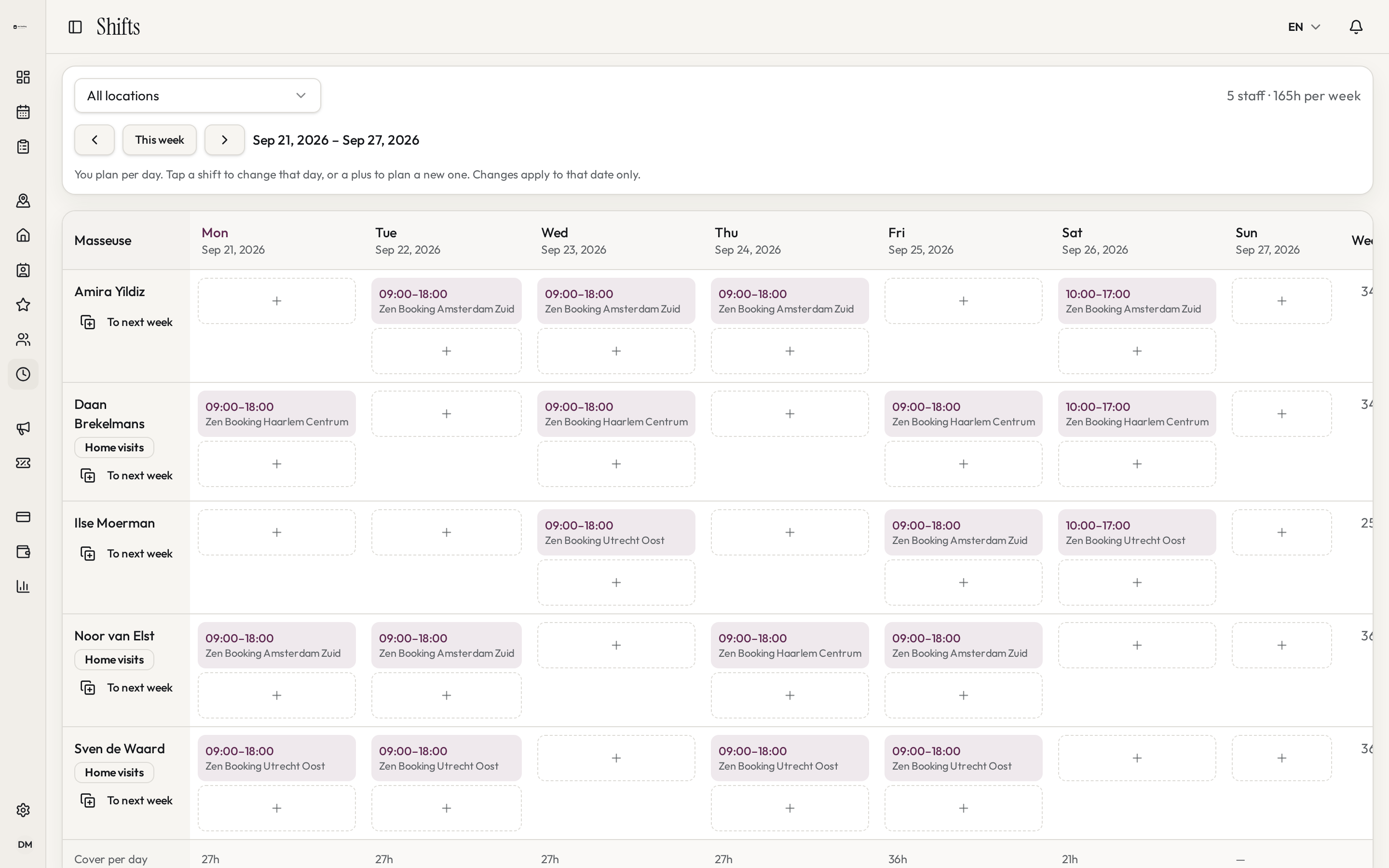
Rosters per location
Schedule staff at the location where they actually work. A local manager can only:
- view rosters of their own locations;
- add and adjust shifts;
- schedule staff at allowed locations.
Shifts at other locations stay out of view, so nobody accidentally changes another location's roster.
The right access for every role
Owner
See and manage everything from one workspace.
Location manager
Only work with the locations they're responsible for.
Staff member
Only see their own appointments and relevant information.
Central administration
Access to several or all locations, depending on the work.
No separate systems per location
Multiple locations doesn't mean multiple accounts or separate admin. Every location stays part of the same business. So you keep:
- one customer database
- one staff list
- one system for appointments and planning
- a central overview for the owner
- local access for managers
Frequently asked questions
Can I decide per location who has access?
Yes. You can give admins access to all locations or only to selected ones.
Can a manager see only their own location's appointments?
Yes. With limited location access, a manager only sees and manages appointments at the locations they have access to.
Can staff work at several locations?
Yes. A staff member can be linked to several locations. A local manager only sees the parts that belong to their own locations.
Can I hide financial information?
Yes. Financial access is a separate permission, so someone can manage appointments and rosters without seeing financial data.
Can the owner still see everything?
Yes. An admin with full access keeps an overview of all locations, staff, appointments and settings.
Do local managers see all customers?
No. A location-bound admin only sees customers linked to appointments at their allowed locations.
Can I add locations later?
Yes. You add new locations within the same business and then link them to staff and admins.
Grow without making admin harder
Add a location, decide who works there and give admins the right access. Everything else keeps working in the same workspace.